
HOW TO PLAY
Earth Estimator
A geography game about understanding the world well enough to make a good estimate.
Earth Estimator is built around real-world statistics. Depending on the game mode, you will either estimate a numerical value or compare two countries and decide which one better matches the question.
You are not expected to know every answer.
That is the point.The goal is to use what you already know about countries, geography, economics, demographics, climate, society, and the world around you to make the best decision you can.
THE IDEA
What is Earth Estimator?
How well can you estimate a planet?
Earth Estimator takes geographical and statistical data and turns it into a game.
Instead of only asking about capitals, flags, or locations, Earth Estimator can ask about statistics such as population, land area, GDP, median age, life expectancy, rainfall, coastline length, military spending, internet usage, energy, education, health, transport, and many other subjects.
What is the population of Sweden?
What is the median age of Japan?
What is the land area of Denmark?
Or, in Two Choice Game, you may instead be given two countries and have to decide which one is the correct choice for the statistic being shown.
You are not expected to memorize thousands of values.
Earth Estimator is about reasoning.
You may not know Argentina's exact cattle population, but you may already know that Argentina is large, agricultural, and relatively sparsely populated.
You may not know Norway's exact coastline length, but you probably know something about Norway's shape, geography, and how it compares with other countries.
That information gives you somewhere to start.
Over time, numbers that once felt abstract begin to gain context.
Ten million people starts to feel different from one hundred million.
A country with a GDP per capita of $20,000 starts to have meaning when compared with countries you have already seen.
A land area of 50,000 square kilometres starts to feel small next to a country covering two million.
The goal is not simply to memorize statistics.
The goal is to build an intuition for Earth.
BEFORE PLAYING
The Home Page
The Home page is where you choose how you want to play and where you can follow your previous results.
2.1
Your Hit Rate
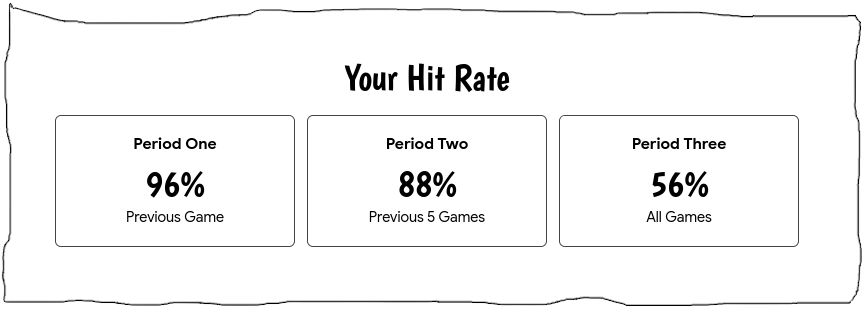
The Hit Rate section shows how your performance has changed over time.
Vanilla Game and Two Choice Game each have their own result history.
For each mode, you can see information about your recent performance.
Your final result from the most recent completed game.
Your average result across your five most recent games.
If you have played fewer than five games, the average uses the games currently available.
Your average across every recorded game for that mode.
The chart also lets you see how your results change from game to game.
Custom Game is designed for freely configured practice and does not add results to the main Hit Rate history.
2.2
Choose a Game Mode
Earth Estimator currently has three game modes.
The standard numerical Earth Estimator experience.
Compare two countries and choose the correct one.
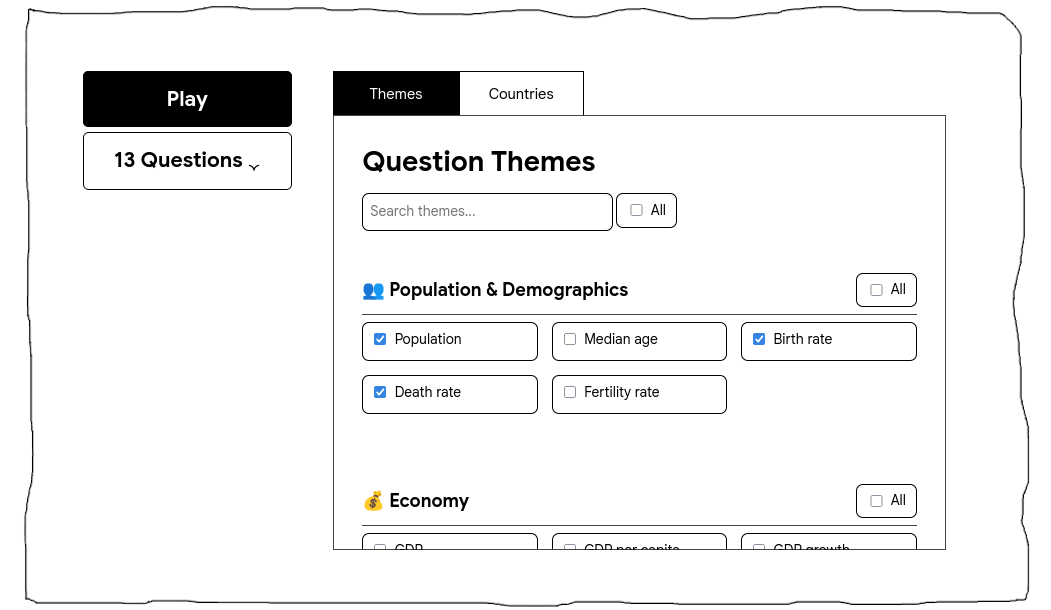
Choose your own countries, themes, and game length.
Each mode approaches the same underlying world data differently.
VANILLA GAME
The Standard Earth Estimator Experience
Vanilla Game is the standard numerical estimation mode.
It is designed to give you a balanced game without requiring any setup.
A Vanilla Game always contains 10 questions.
All available themes and countries are included automatically.
The country and theme controls are therefore locked while Vanilla Game is selected.
You simply choose Vanilla Game and start playing.
3.1
One Country Per Game
A Vanilla round uses one eligible country for the round.
The game then asks you a series of different statistical questions about that country.
This means that as the game continues, you begin building a broader picture of the same place instead of jumping randomly between countries every question.
3.2
Ten Different Questions
A Vanilla Game contains 10 questions.
The game avoids repeating the same metric within that round, giving you a variety of statistics to estimate.
TWO CHOICE GAME
Choose Between Two Countries
Two Choice Game changes the way you answer.
Instead of typing a numerical estimate, you are presented with two countries and a statistic.
Your job is to decide which of the two countries is the correct choice for the question.
This makes Two Choice Game faster and more comparative than Vanilla Game.
You do not need to know the exact number.
You only need enough geographical intuition to decide which country makes more sense.4.1
Twenty Questions
Two Choice Game always contains 20 questions.
All available themes and countries are used automatically.
Just like Vanilla Game, its game settings are locked because the mode has its own fixed rules.
4.2
Compare What You Know
Imagine being shown two countries for a population statistic.
Even if you do not know either country's exact population, you may know that one is much larger, more densely populated, or more urbanized than the other.
The same reasoning can be used for economic, environmental, demographic, geographical, technological, health, or other statistics.
Two Choice Game tests your ability to compare countries rather than calculate an exact estimate.
4.3
Your Two Choice Result
Your correct answers are tracked throughout the round.
When the game ends, your final Two Choice result becomes part of the Two Choice Hit Rate history on the Home page.
CUSTOM GAME
Build Your Own Game
Custom Game gives you control over what can appear.
This is the mode to use when you want to practise specific countries, specific subjects, or create a completely mixed game of your own.
5.1
Choose Your Themes
Themes determine what kinds of statistics can appear.
Depending on the available data, these can include subjects connected to areas such as:
- Population and demographics
- Economy
- Geography
- Environment
- Health
- Education
- Technology
- Transport
- Government
- Military
- Lifestyle
- And other statistical categories
You can select individual themes or larger groups of themes.
5.2
Choose Your Countries
Countries determine where your questions can come from.
You can select individual countries, groups of countries, entire continents, or a broad worldwide selection.
This lets you create very different games.
European economies
African demographics
Asian geography
Environmental statistics from around the world
A game focused only on countries you want to learn more about
5.3
Choose the Number of Questions
Custom Game lets you choose the length of your round.
You can use one of the available choices or enter your own number between 3 and 50 questions.
A shorter game is useful for a quick round.
A longer game gives you more opportunities to practise and usually produces a more representative final average.
Custom Game results are not added to the main Hit Rate history.
NUMERICAL GAMEPLAY
How Vanilla and Custom Questions Work
Vanilla Game and Custom Game use numerical estimation.
6.1
Read the Question
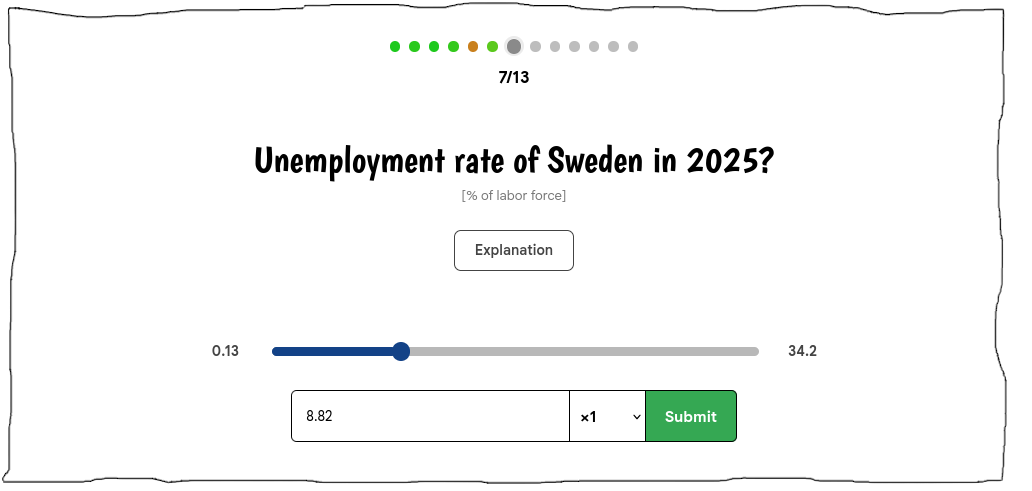
Each question shows a country, a statistic, a year, and the unit used to measure the statistic.
The unit is important.
Two statistics may sound similar while measuring very different things.
If you do not understand the metric or the unit, use the explanation available in the game.
The explanation tells you what the statistic represents and what its unit means.
6.2
Make Your Estimate
Enter the number you believe is closest to the real value.
For large values, Earth Estimator includes multipliers that make large numbers easier to enter.
You do not need to type every zero manually.
6.3
Submit Your Answer
Once your answer is valid, you can submit it.
After submitting, Earth Estimator shows the result for that question.
You can see:
- The correct value
- The unit
- Your accuracy for the question
The result screen then continues automatically after a short countdown.
6.4
Follow Your Progress
Each question in the round is represented by a progress indicator.
Before answering, the question is shown as unanswered.
After answering, its appearance changes depending on how accurate your estimate was.
Unanswered
Far away
Getting closer
Highly accurate
The completed progress row gives you a quick visual summary of how consistent your estimates have been throughout the game.
6.5
Your Final Result
Every numerical question receives an accuracy score between 0% and 100%.
At the end of the round, all question scores are averaged together.
That average becomes your final game accuracy.
For Vanilla Game, the completed result is added to your Vanilla Hit Rate history.
Custom Game can still show you how you performed during the round, but its result is not added to the main Hit Rate charts.
SCORING
How Numerical Accuracy Works
Earth Estimator does not use ordinary percentage error.
Ordinary percentage error can behave badly when comparing statistics of very different sizes.
Being 10 units wrong when the correct answer is 20 is very different mathematically from being 10 units wrong when the correct answer is 20 million, even if both guesses may represent similar reasoning within their respective datasets.
Earth Estimator instead compares your mistake with the full available range of that metric.
7.1
Step One: Calculate the Difference
The game first measures the absolute distance between your estimate and the correct answer.
7.2
Step Two: Compare It With the Metric Range
Imagine the smallest available value for the metric is 0 and the largest is 100.
The total range is therefore:
Your answer was 10 units away.
Your estimate is therefore 10% of the entire available range away from the correct answer.
Being too high and being too low are treated equally.
Only the distance matters.
7.3
Step Three: Apply the Accuracy Curve
Earth Estimator then converts that range error into an accuracy score.
The scoring curve is:
This means that close estimates are rewarded strongly, while accuracy falls increasingly quickly as your answer moves farther away.
| Distance from correct answer | Accuracy |
|---|---|
| Exact answer | 100% |
| 5% of range away | 81% |
| 10% of range away | 64% |
| 20% of range away | 36% |
| 30% of range away | 16% |
| 40% of range away | 4% |
| 50% or more of range away | 0% |
7.4
Why Use a Curve?
The curve discourages blindly guessing the middle of the available range.
Imagine every possible value lies between 0 and 100 and you guess 50 every time.
A middle guess may occasionally work, but it is not a reliable strategy.
The system rewards estimation rather than simply playing the middle.
To score well, you need to think about where the answer actually belongs.7.5
When Every Available Value Is the Same
Very rarely, a metric may have no numerical range because its available minimum and maximum are identical.
In that situation:
- An exact answer receives 100%.
- Any different answer receives 0%.
7.6
Final Game Accuracy
After every question, its accuracy is added to the running total.
At the end of the game:
If you play 10 questions, your final result is the average accuracy of those 10 estimates.
One lucky answer cannot carry the entire game.
A strong result comes from consistently good estimates.SAVED GAMES
Continue Where You Left Off
Earth Estimator can preserve an unfinished Vanilla Game or Two Choice Game.
If you leave the game, return to the Home page, refresh the browser, or come back later, the active round can continue instead of generating a completely new set of questions.
Leaving after a bad answer does not reroll the question.
Your active round stays your active round.8.1
Playing as a Guest
When you are signed out, supported game information and results are stored in your browser.
This means they belong to that browser or device rather than to an Earth Estimator account.
8.2
Playing While Signed In
When you are signed in, supported game settings and completed results can be connected to your account.
This lets Earth Estimator use your account data instead of relying only on that browser's local storage.
Your visible account controls are available from the navigation bar and sidebar.
DATA MAP
Explore the Data Without Playing
Earth Estimator is not only a game.
The Data Map lets you explore the statistics behind the questions directly.
9.1
Search for a Metric
Use the question search at the top of the Data Map to find the statistic you want to explore.
Once selected, the page shows:
- The metric name
- An explanation of the metric
- An explanation of the unit
- A world map
- A country-by-country data list
9.2
Read the World Map
Countries with available data are shaded according to their value.
The map adapts its colour scale to the distribution of the selected statistic so that differences between countries remain useful even when a few countries have unusually large values.
Hover over a country to see its information.
The popup can show:
- Its ranking
- Country name
- Value
- Unit
- Year
Countries without available values remain visually separate from countries with data.
9.3
Country Rankings
You can order the country list from:
- Highest to lowest
- Lowest to highest
- Alphabetically
When sorting by highest or lowest, countries with data receive a ranking.
1. Sweden
2. Norway
3. Denmark
The ranking shown in the country list is the same ranking used by the world-map popup.
Countries without a value do not receive a rank.
Alphabetical mode is for browsing rather than ranking, so ranking numbers are not shown there.
9.4
Search for a Country
The country search lets you narrow the list without changing the real ranking.
For example, if Sweden is ranked 14th globally and you search for Sweden, it remains number 14.
It does not become number 1 simply because it is the only visible search result.
Open the Data Map to search through the statistics currently available in Earth Estimator.
Open Data MapSOURCE INFORMATION
Where Does the Data Come From?
Earth Estimator provides a Source Information page for inspecting the data behind individual country values.
When source information is available, you can open it from the relevant country data.
The page identifies the selected:
- Question
- Country
- Year
It can also show the source information associated with that exact record.
This makes it possible to move from playing or exploring a statistic to checking where that information came from.
The Source Information page is especially useful when:
- You want to verify a surprising value
- You want to know which year the statistic represents
- You want to inspect the source behind a country entry
- You want to understand the data rather than only use it in the game
LEARNING
Do More Than Chase a Score
Earth Estimator works best when you treat wrong answers as information.
If your estimate was far too high, ask why.
Was the country smaller than you thought?
Less populated?
Less wealthy?
Younger?
More rural?
More industrial?
More dependent on agriculture?
If two countries surprised you in Two Choice Game, remember the comparison.
If a value on the Data Map looks unusual, inspect the surrounding countries.
If you want to know why a particular number appears, open its Source Information.
The game, Data Map, and sources are designed to work together.
Play the game. Compare countries. Explore the map. Check the data. Then play again with a slightly better understanding of the world.ONE LAST THING
There is usually a better guess than “I have no idea.”
Think about the country.
Is it large or small?
Rich or poor?
Urban or rural?
Young or old?
Densely populated or sparsely populated?
Is it industrial, agricultural, mountainous, tropical, dry, isolated, or highly developed?
What countries are similar to it?
What countries are completely different?
You may not know the exact answer, but you can often work out what the answer probably isn't.
You do not need to know every number on Earth. You just need to make the best estimate you can.
Start a Game